

⚡ TLDR
A fine-tune of Qwen 27B on Databricks’ AI Runtime took 7 hours 44 minutes with the GPUs reporting 98% utilization. After two changes it took 1 hour 17 minutes. Same model, same data, same hardware.
Installing two fused-kernel packages: 7h44m to 2h05m (3.7x)
Packing batches instead of padding them: 2h05m to 1h17m (another 1.6x)
Neither change touched the model architecture or the hyperparameters. One was a pip install. The other was a data loader rewrite.
The thing to take away is about the metric. GPU utilization measures the fraction of time the GPU was doing anything at all. It says nothing about whether the thing it was doing was useful, and a GPU running 269,000 tiny kernels per step will happily report 98% while delivering a sixth of its possible throughput.
The part of this story that bugs me most is that the fix already existed. Somebody had written the kernels, somebody at Hugging Face had wired them into the model, and the knowledge still didn’t make it to the team running the job. Solved once, solved nowhere else. Today’s sponsor is built around exactly that gap, for agents instead of kernels.
Your AI should learn from the work it does.

When your AI figures something out, why should it have to start from scratch the next time?
Skyflo’s HyperAgent learns from completed work, turning successful workflows into reusable skills. It can also evaluate improvements to how it selects and coordinates AI agents, so the system itself can get better over time.
And it does so within boundaries you control. Approvals, credentials and spending limits remain protected.
Skyflo is the agentic operating system for your company. Bring the AI agents you already use together and make every project build on what came before.
Start free on macOS 14+. No card required.
📊 The number that looked fine
The setup is about as standard as LLM fine-tuning gets. Qwen 27B loaded through transformers in bf16, FSDP2 to shard the weights and optimizer state across GPUs (a 27B model won’t fit on one card any other way), activation checkpointing to buy batch size with recompute, AdamW, and the ultrachat_200k SFT dataset. Batches are 2D tensors, 8,192 tokens wide, each row padded out to the longest example in the batch.
Baseline over the full dataset: 7 hours 44 minutes, 9,396 tokens per second, 98% average GPU utilization.
Most teams would ship that. The utilization number says the hardware is saturated, so the only ways forward look like more GPUs or a smaller model. Both are wrong here, and the reason is what the utilization metric actually counts. It’s the percentage of sampling intervals in which at least one kernel was executing. A GPU running one well-shaped matmul at full occupancy and a GPU running a stream of tiny elementwise ops with the cores mostly idle both show the same number. It’s closer to a CPU’s load average than to a throughput measurement.
The Pinterest training slowdown was the same lesson from the other direction: the top-level metric moved and nobody could tell why until someone went down to page tables. The fix in both cases is the same. Stop reading the summary and trace a step.
🔬 One traced step
PyTorch’s profiler will record a single training step with CPU and CUDA activity. Wrap the loop, skip one step for warmup, trace one, print the top operations by self CUDA time. That’s the whole procedure, and it took the hidden problem from invisible to obvious.
Two things jumped out of the trace, and they’re related.
The CPU was slower than the GPU. One step was 14.4 seconds of CPU time against 10.3 seconds of GPU time. In a healthy training loop the CPU enqueues kernels asynchronously and runs well ahead of the device. Here the GPU was waiting for the CPU to hand it the next thing to do. A GPU stalled on the host still shows up as busy in the utilization counter, because something is always in flight. It just isn’t in flight for long.
There were far too many operations. 1.7 million CPU calls and 269,448 GPU kernel launches in one step. The batched matmul alone ran 31,105 times. Elementwise add, multiply, fill, and copy accounted for most of the GPU time, in kernels averaging 10 to 50 microseconds each. That’s launch overhead and memory round-trips dressed up as compute.
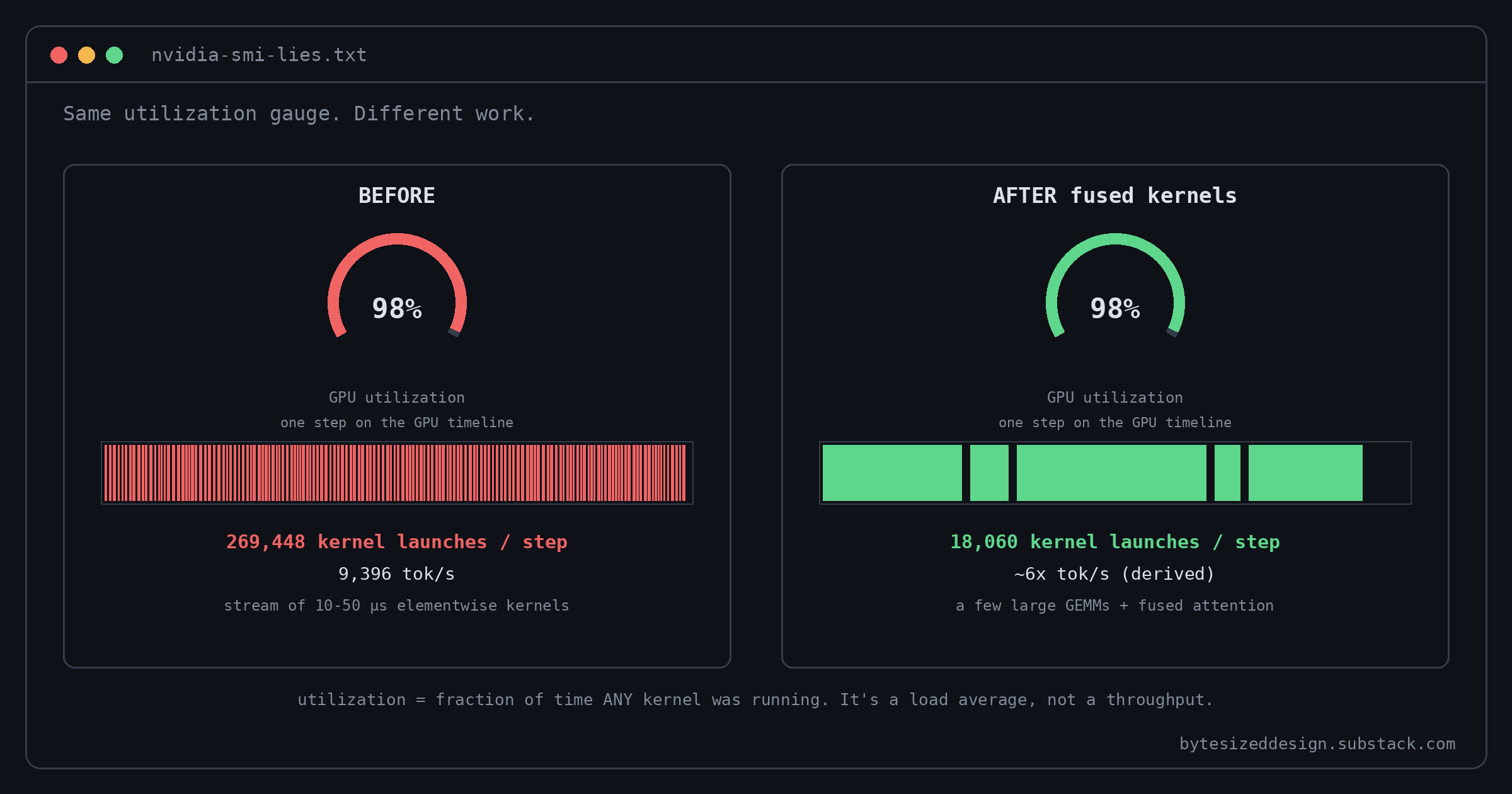
Once you see the launch count, the diagnosis writes itself. The model’s forward and backward passes were being expressed as hundreds of thousands of small kernels, the CPU couldn’t dispatch them fast enough, and the GPU spent its time starting and stopping instead of multiplying.
🔧 Fix one: the kernels were a pip install away
Three standard tools exist for collapsing many small kernels into few big ones, and two of them were ruled out pretty quickly:
CUDA graphs record a sequence of kernels and replay it with one CPU call. They want static shapes and a static graph, and FSDP2’s dynamic sharding doesn’t cooperate
torch.compiletraces the model and fuses what it can with Triton. With this many ops the compile time is long, and it won’t rediscover something like Flash Attention on its ownHand-written fused kernels from the community, built for specific layer types
The standard attention layers in Qwen already go through PyTorch’s SDPA, which is fine. The flood of tiny ops was coming from the non-standard gated delta network layers. Two packages, flash-linear-attention and causal-conv1d, exist specifically to fuse those layers, and the transformers implementation of Qwen lists both as supported. They just weren’t installed.
After installing them: 2 hours 5 minutes. Launches per step dropped from 269,448 to 18,060, a 15x reduction. The elementwise kernels at the top of the GPU table were replaced by chunk_gated_delta_rule and flash_attention_3, and the big GEMMs are now most of the time, which is what a healthy trace looks like.
The part that should make you nervous is that nothing warned anyone. transformers checked for the fast kernels, didn’t find them, and quietly fell back to a slow pure-PyTorch path that produced correct results at a fraction of the speed. The same silent fallback happens if you pull a kernel from Hugging Face’s Kernel Hub and the build for your exact torch and CUDA versions isn’t there. Databricks recommends baking the kernels into your container at build time, which is correct, and I’d go one step further: assert at startup that the optimized path is loaded, and fail the job if it isn’t. A fine-tune that silently runs 3.7x slower is worse than one that refuses to start, because the slow one burns the GPU hours before anyone notices.
One more caveat worth knowing before you go kernel shopping. Some community kernels only implement the forward pass, because they were written for inference. Training needs both directions.
📦 Fix two: stop paying for padding
With the kernels in, the trace looked healthy and the model was still spending a lot of its time multiplying zeros.
The batches were 2D: rows of examples, each row padded to the longest example in that batch, 8,192 tokens wide because that’s the biggest batch that fit in memory. Chat data has a wide length distribution, so a lot of each tensor was padding, and padding goes through every matmul like real tokens do.
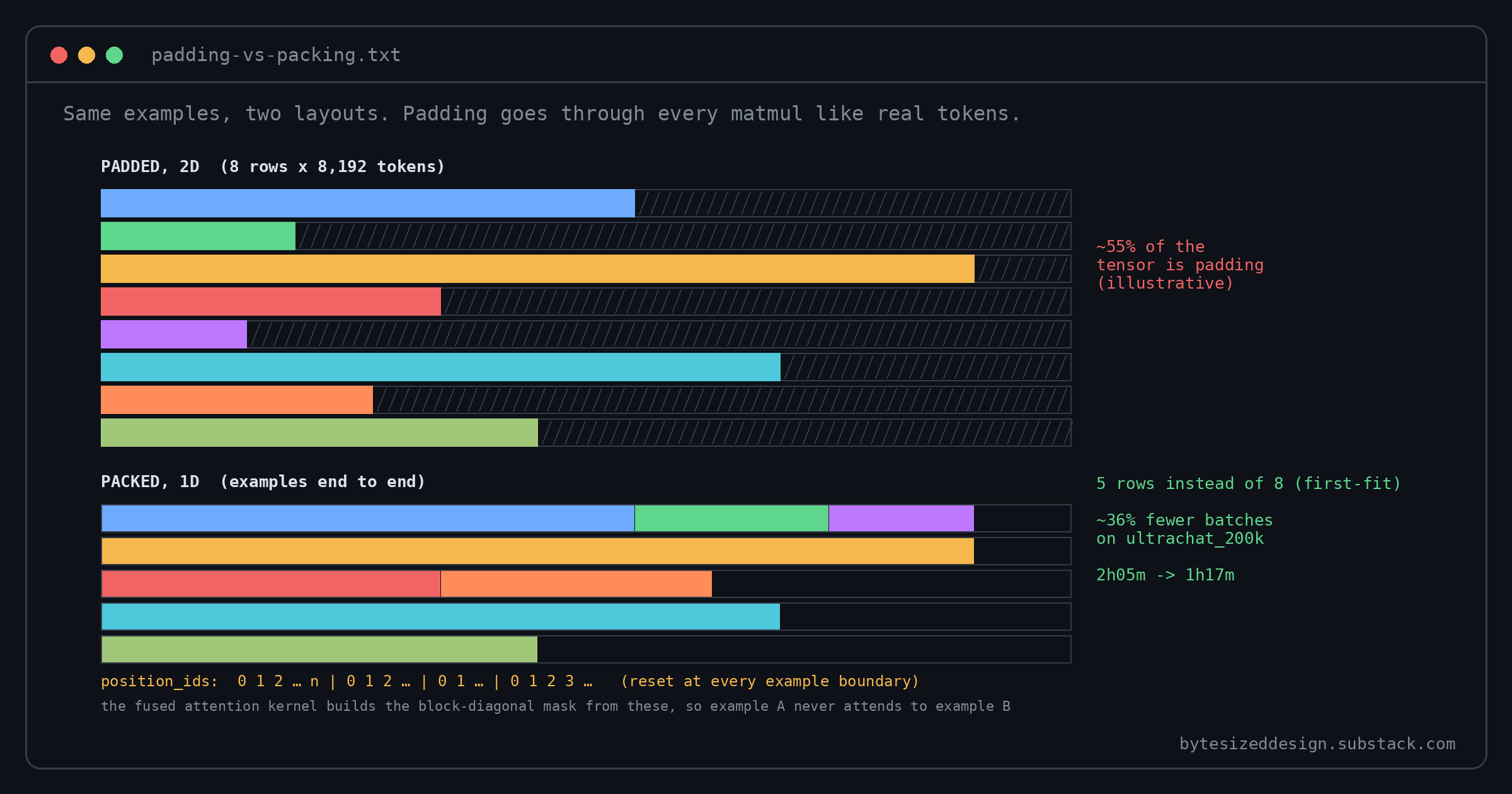
The alternative is 1D packing: lay examples end to end in a single sequence with no gaps. For pretraining you can more or less just do that. For fine-tuning you can’t, because tokens from one example must never attend to tokens from the neighboring one. The fix is to pass position_ids that reset to zero at each example boundary. The model forwards those to the fused attention kernels, and the kernels build the correct block-diagonal mask from them.
PyTorch’s NestedTensor would solve the same problem more cleanly for a model that only used standard attention, but flash-linear-attention only takes the 1D packed layout, so 1D packed is what you use.
Result: 2 hours 5 minutes to 1 hour 17 minutes. Two reasons, one big and one small:
Packing fits more sequences per batch, which cut the total number of batches by about 36% on this dataset. Your number will depend on your length distribution
The flash-linear-attention kernels JIT-compile per input shape. Padded batches had dynamic shapes, so they’d been paying a few minutes of recompilation during the run. Packed batches have one shape
The trade-off is that the input pipeline got more complicated, and a bug in the position_ids computation would corrupt the attention mask and quietly damage model quality rather than crash. There’s a cheaper trick, sorting examples by length so each batch pads less, but that introduces length correlation between adjacent samples and can bias training. Databricks took the packing route and I’d do the same, with a unit test that checks the mask on a known small batch before any real run.
🧮 Where the 6x came from
  baseline          7h 44m   9,396 tok/s   98% util
  + fused kernels   2h 05m   (3.7x)        98% util
  + packed batches  1h 17m   (6.0x)        98% util
Utilization sat at 98% through every stage, which is the cleanest demonstration I’ve seen that the number is useless as a target. Tokens per second, kernel launches per step, and CPU time versus GPU time per step were the three numbers that told the story, and only one of them is on a default dashboard.
📌 What to steal
Trace one step before you buy more GPUs.
torch.profileraround a single iteration, sorted by self CUDA time, takes ten minutes to set up. If the top of the table is elementwise ops with six-digit call counts, you have a kernel problem, and more GPUs will only make it a more expensive kernel problemCheck CPU time against GPU time per step. If the host is slower, the device is stalled, whatever utilization says
Install the kernels your model supports, and verify they loaded. Read the model’s
transformersimplementation for the kernel names, bake them into the container, and assert the fast path at startup. Silent fallback is the villain of this storyPack, don’t pad, for SFT. Pass example-boundary
position_ids, test the mask, and expect something in the range of a third fewer batches on chat-style dataPut tokens per second next to utilization on every training dashboard. One without the other is how 98% hides a 6x
🤔 What’s missing
The write-up reports wall-clock time at each stage and tokens per second only for the baseline. I’d have liked the final tok/s figure stated outright (the implied number is around 56,000 if the speedup is uniform, but that’s my arithmetic). It also leaves out how many GPUs the job ran on, which matters for anyone trying to compare their own numbers. And the CPU-bound finding leaves one thread hanging. After the kernel fix, the write-up doesn’t show the new CPU-versus-GPU split, so it’s unclear whether the host is now comfortably ahead or whether a third fix is sitting in FSDP2’s host-side overhead.
The last paragraph of the write-up turns into a pitch for the platform. Fair enough, it’s their blog. The two techniques work anywhere PyTorch runs.
What does your training dashboard show besides utilization? Hit reply. I’m collecting examples of metrics that looked healthy right up until someone traced a step.
Source:
Databricks Engineering, Reducing Qwen training time by 6x on AI Runtime (Oct 14, 2026), Bruce Fontaine and Pardis Beikzadeh: https://www.databricks.com/blog/reducing-qwen-training-time-6x-ai-runtime