

BYE-BYE-BORING (Sponsored By SketchWow)

More dull diagrams in 2025? Nope. We gotchu!
Paste in text or a URL. In 9 seconds, generate dozens of eye-catching visuals (mind maps, animated diagrams, visual summaries, infographics) to communicate your ideas, solutions, process and more.
Give SketchWow a try for 30 days. See what happens!
Use This Link. You'll Save An Extra 10%!
https://sketchwow.com/BYTE10OFF
🚀 TL;DR
Load testing isn’t just about throwing traffic at your system and hoping for the best. It’s about simulating real-world usage, uncovering bottlenecks, and ensuring your infrastructure can handle peak demand without falling apart. If you’re only running tests on your laptop, you’re not load testing, you’re daydreaming.
Today, we’ll cover:
✅Why load testing is critical (and why most teams do it wrong)
✅The different types of load tests and when to use them
✅How to design effective test scenarios
✅Common pitfalls that lead to misleading results
✅Real-world Load Testing from companies (paid)
✅ Best Tools for Load Testing (paid)
Why Load Testing Is More Than Just “Throwing Traffic” 🚦
Imagine you run a food delivery app. Every Friday night, demand surges. If your servers slow down or crash, users churn, restaurants lose orders, and your customer support team gets flooded.
The same applies to any system, whether it's an e-commerce site during Black Friday, a bank handling millions of transactions, or a SaaS platform scaling up.
Yet, many teams don’t test under realistic conditions. They make three critical mistakes:
❌ Testing with unrealistic loads – Simulating 1,000 users with perfectly spaced-out requests doesn’t reflect the chaotic reality of real traffic.
❌ Ignoring backend bottlenecks – It’s not just about HTTP requests. If your database, cache, or message queues can’t keep up, the system collapses.
❌ Not accounting for real-world network behavior – In the real world, users have bad connections, slow mobile networks, and unpredictable spikes.
What Kinds of Load Testing Are There?
An application performs differently depending on the volume and duration of traffic it handles. You should never assume your app will behave the same when handling 100 vs. 1,000 or 10,000 users.
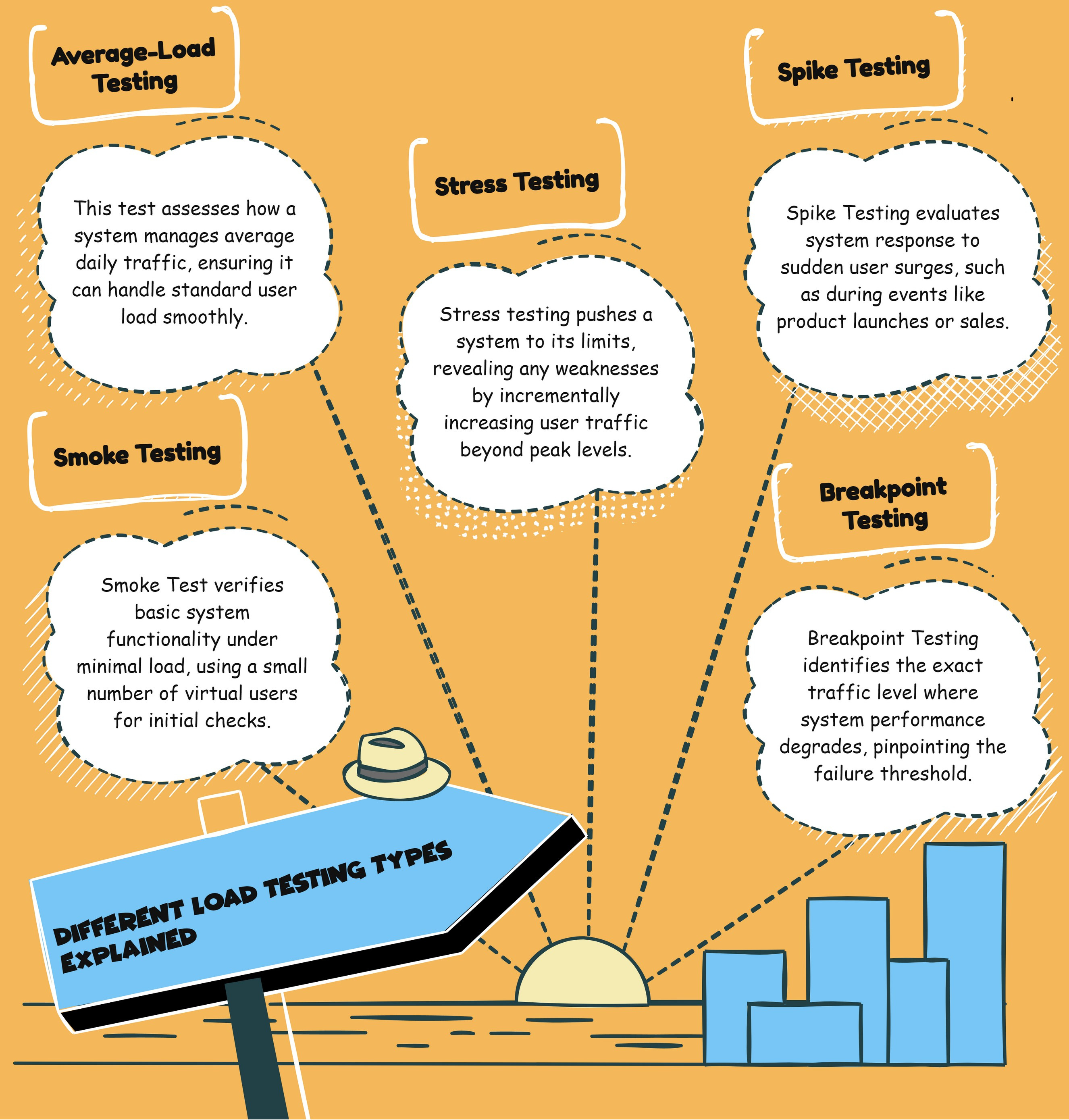
Here are all types of load testing, each designed to measure performance under different conditions.
1️⃣ Smoke Test (Basic Health Check 🔥)
📌 Goal: Verify that the system functions under minimal load.
📌 Use Case: Gather baseline performance values.
📌 Example: Running a small test with 5-10 virtual users (VUs) for a few minutes to ensure key services are working.
2️⃣ Average-Load Test (Day-in-the-Life Test 📊)
📌 Goal: Assess performance under typical load conditions.
📌 Use Case: Measure how a system handles normal daily traffic.
📌 Example: Simulating regular production load for 30-60 minutes to ensure smooth operations.
3️⃣ Stress Test (Breaking Point Test 💥)
📌 Goal: Push the system to extreme limits to identify weak points.
📌 Use Case: Determine how much traffic a system can handle before it fails.
📌 Example: Gradually increasing traffic beyond expected peak load to see when performance degrades.
4️⃣ Spike Test (Sudden Traffic Burst ⚡)
📌 Goal: Check how a system reacts to sudden surges in traffic.
📌 Use Case: Product launches, viral content, Black Friday sales.
📌 Example: Instantly increasing traffic 10x in seconds to see if the system can handle the spike.
5️⃣ Breakpoint Test (System Limits Test 🚧)
📌 Goal: Find the system’s absolute breaking point.
📌 Use Case: Discover when performance starts to degrade and where failure begins.
📌 Example: Increasing requests until response times become unacceptable or services start failing.
6️⃣ Soak Test (Long-Term Stability Test ⏳)
📌 Goal: Evaluate system performance over extended periods.
📌 Use Case: Identify memory leaks, database slowdowns, and resource exhaustion over time.
📌 Example: Running a continuous test for 12-24 hours at normal traffic levels to catch slow failures.
How to Design a Realistic Load Test 🎯
To get meaningful results, your test needs to mimic real-world conditions. Here’s how:
✅ Simulate real user behavior – Not every user clicks at the same time. Introduce randomness in request rates, delays, and data sizes.
✅ Test full-stack performance – Don't just test your API. Include database, caching, message queues, and background jobs in your load test.
✅ Account for network latency – Real users don’t have perfect connections. Introduce packet loss, jitter, and slow mobile networks in your tests.
✅ Use production-like test environments – Running load tests on a developer laptop or a staging server won’t expose real bottlenecks.
Example Load Test Scenario
Say you run an e-commerce platform. A realistic test would:
📌 Simulate users browsing, adding items to the cart, and checking out.
📌 Introduce load spikes during flash sales.
📌 Account for database contention—does the checkout process slow down under load?
📌 Measure CPU, memory, database queries, and API response times.
The Steps To Build A Solid Load Testing Strategy 🔍
A well-executed load test requires defining goals, crafting realistic scenarios, and analyzing results. Follow these steps to ensure your tests provide actionable insights instead of misleading data.
1️⃣ Determine Load Testing Goals 🎯
Before running a test, ask:
✅ What are we trying to measure? (Response time, system limits, failure points?)
✅ What’s our success criteria? (Acceptable latency, max throughput?)
✅ Are we testing for normal traffic, peak traffic, or failure resilience?
💡 Example: A payment processing system might define success as handling 10,000 concurrent transactions with <200ms response time.
2️⃣ Establish Realistic Test Scenarios 🔄
Not all traffic is the same. Your test should reflect real-world user behavior, including:
✅ Varied request patterns – Some users browse, some purchase, some abandon carts.
✅ Randomized interactions – Users don’t behave like robots.
✅ Multi-step workflows – Some requests trigger background jobs or database updates.
💡 Example: An e-commerce site test should simulate browsing, cart additions, checkouts, and failed transactions, not just a flood of homepage visits.
3️⃣ Choose the Right Tools 🛠️
Your testing tool should match your system architecture and traffic needs:
💡 Tip: Run small-scale tests locally before scaling up in production-like environments.
4️⃣ Set Load Levels 🚦
Every test needs a clear traffic pattern:
✅ Gradual ramp-up – Don’t start at peak load; scale it up.
✅ Sustained load – Keep traffic steady for meaningful results.
✅ Controlled ramp-down – Simulates real-world traffic declines.
💡 Example: A soak test might start at 1,000 users, ramp to 10,000, and sustain for 12 hours to check for memory leaks.
Common Pitfalls (And How to Avoid Them) 🚨
Even experienced engineers get load testing wrong. Avoid these traps:
❌ Hardcoding test data – If your load test reuses the same data, caching will skew results.
🔹 Fix: Use randomized inputs and unique user sessions.
❌ Ignoring cold starts – Serverless and containerized systems often struggle with sudden bursts.
🔹 Fix: Include warm-up requests before measuring response times.
❌ Testing in isolation – A single API endpoint might work fine, but system-wide performance can still collapse.
🔹 Fix: Simulate real-world traffic across the full architecture.
❌ Skipping database load testing – Many bottlenecks arise from slow queries, locking issues, or missing indexes.
🔹 Fix: Run SQL profiling and check query performance under high load.
